Shop Connector
Configuration
You can configure the shop credentials like api base url and access-key in the .env file. For all available configs take a look at the config directory
Shopware 6 example .env:
PLATFORM_BASE_URL       = 'http://my-shopware'
API_BASE_URL            = 'http://my-shopware/store-api'
API_SW_ACCESS_KEY       = 'XXXXXXXXXXXXXXX'
API_CLIENT_ID           = 'XXXXXXXXXXXXXXX'
API_CLIENT_SECRET       = 'XXXXXXXXXXXXXXX'
Composables
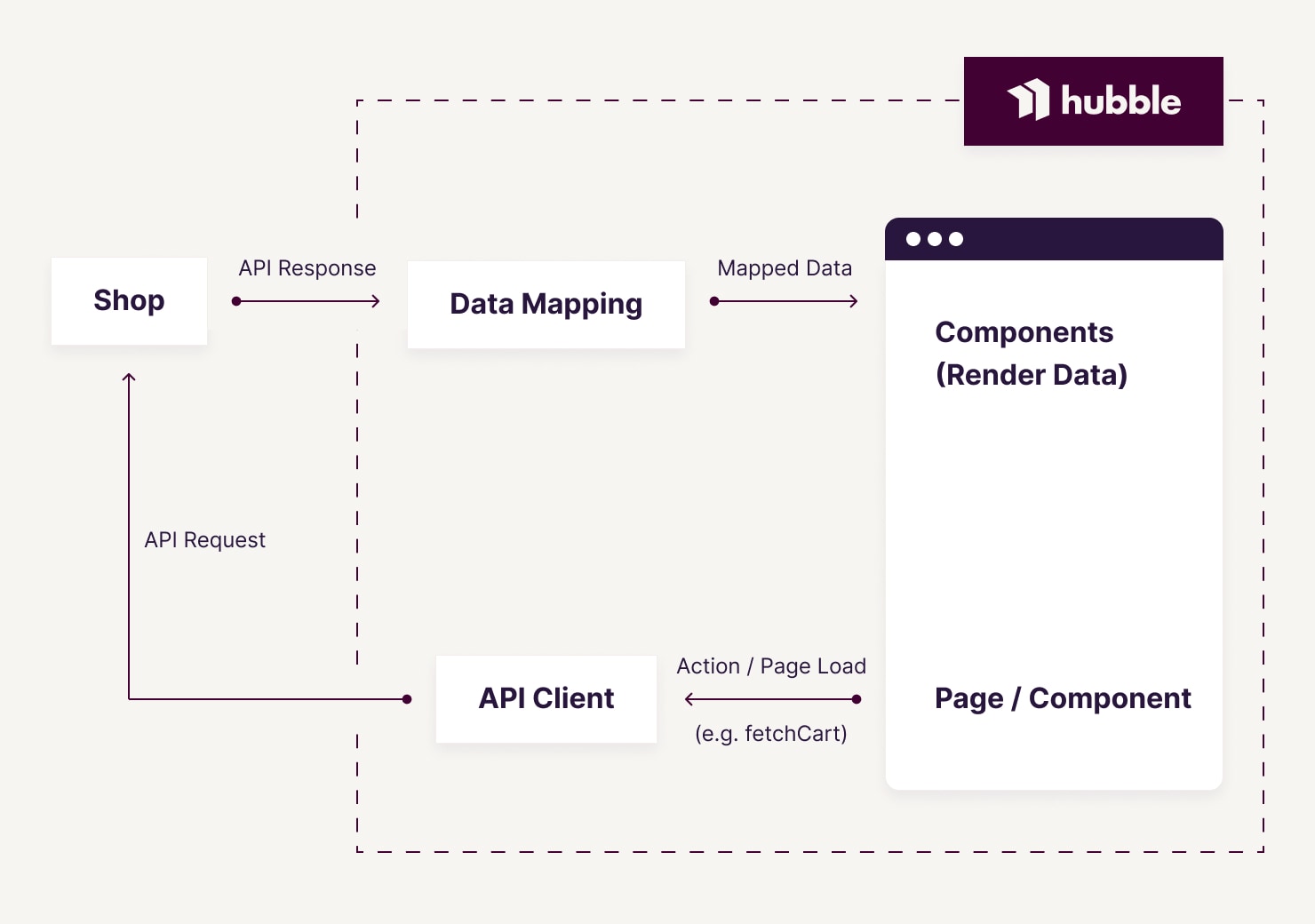
To fetch data from your e-commerce system, hubble provides you a bunch of composables which uses a platform specific api client and maps the responses in a typed and generalized format.
You can find all available composables inside the hubble layer: layers/hubble/composables
Usage
For example to fetch and show the current users cart:
<template>
    <div v-if="loading">
        Loading cart...
    </div>
    <div v-else-if="error && !loading">
        An error occurred: {{ error }}
    </div>
    <div v-else-if="!loading && !error">
        {{ cart }}
    </div>
</template>

<script setup lang="ts">
const cartStore = useCart() // No import needed, composable is auto-imported by Nuxt
const { cart, loading, error } = storeToRefs(cartStore) // States to be used to display in template
const { getCart, deleteCart } = cartStore // functions to manipulate cart
</script>
API Client
Should you want to access your platform api directly nevertheless, you can write your own composable and use the platform specific api-client by yourself.
You can find the api client here: src/platforms/shopware/api-client
Data mapping
To simply fetch data from the api is not enough because our components expect a different data schema. Therefore, the response data need to be mapped first.
Every api client provides its specific mapping helper functions: layers/hubble/utils/mapping
They map the api responses to the common types our components expect: layers/hubble/types